| 1 | IFM |
| 2 | Galley Club |
| 3 | Look Gorgeous!Area Secure to IFM |
| 4 | IFLArea Secure via FAP |
| 5 | Boarding M2LFlying Start |
| 6 | Look Gorgeous! |
| 7 | Galley FirstArea Secure to IFM |
| 8 | Look Gorgeous! |
| 9 | Galley WT |
| 10 | Duty FreePAs |
| 11 | Look Gorgeous! |
| 12 | IFLBoarding U1LArea Secure via FAP |
| 13 | Boarding U1L |
| 14 | Galley WT/WT+ UpperArea Secure via FAP |
| 15 | Flying Start |
| 16 | Galley Club Upper |
| 17 | Look Gorgeous! |
| 18 | Look Gorgeous! |
| 19 | Look Gorgeous! |
| 20 | Boarding M1L |
| 21 | Look Gorgeous! |
| 22 | Look Gorgeous! |
| IFM | |
| GO | |
| GO | |
| IFL | GO |
| DF | |
| IFL | GO |
| GO | |
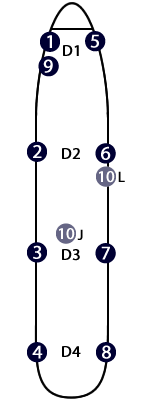
| 1 | IFM |
| 2 | Support WT/WT+ |
| 3 | Boarding D2LFlying Start |
| 4 | IFL |
| 5 | Boarding D1LGalley First |
| 6 | Look Gorgeous! |
| 7 | Duty Free |
| 8 | Galley WT/WT+PAs |
| 9 | Look Gorgeous! |
| 10 | Look Gorgeous!Crew Seat - 24D or D2R |
| IFM | GO |
| DF | |
| IFL | GO |
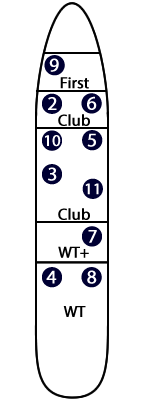 *3 Secures WT/WT+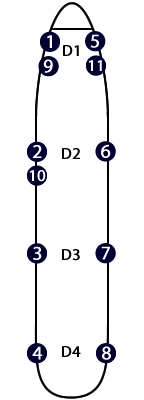
| 1 | IFM |
| 2 | Galley Club |
| 3 | Boarding D2LFlying Start |
| 4 | IFL |
| 5 | Galley FirstBoarding D1L |
| 6 | Look Gorgeous! |
| 7 | Duty Free |
| 8 | Galley WT/WT+PAs |
| 9 | Look Gorgeous! |
| 10 | Look Gorgeous! |
| 11 | Look Gorgeous! |
| IFM | |
| GO | |
| GO | |
| DF | |
| IFL | GO |
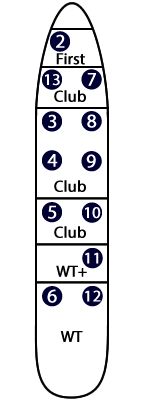
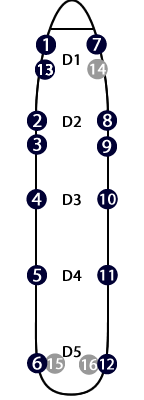
| 1 | IFM |
| 2 | Personal Demo 1K, 2K |
| 3 | Look Gorgeous! |
| 4 | Look Gorgeous! |
| 5 | Boarding D2LFlying Start |
| 6 | IFL |
| 7 | Galley FirstBoarding |
| 8 | Galley Club |
| 9 | Look Gorgeous! |
| 10 | Support Galley after bar |
| 11 | Duty Free |
| 12 | PAsGalley WT/WT+ if IFL not |
| 13 | Look Gorgeous! |
| IFM | |
| GO | |
| GO | |
| DF | |
| IFL | GO* |
| ** | |
| * If IFL not. | |
| ** If carried. | |
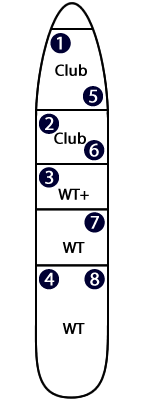
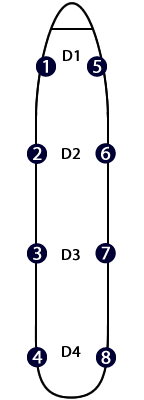
| 1 | IFM |
| 2 | Look Gorgeous! |
| 3 | Boarding D2LFlying Start |
| 4 | IFL |
| 5 | Boarding D1L |
| 6 | Galley Club |
| 7 | Duty Free |
| 8 | Galley WT/WT+PAs |
| IFM | |
| GO | |
| DF | |
| IFL | GO |
| 1 | IFM |
| 2 | Look Gorgeous! |
| 3 | Boarding D2LFlying Start |
| 4 | IFL |
| 5 | Boarding D1L |
| 6 | Galley Club |
| 7 | Duty Free |
| 8 | Galley WT/WT+PAs |
| IFM | GO |
| DF | |
| IFL | GO |
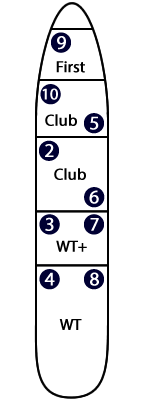
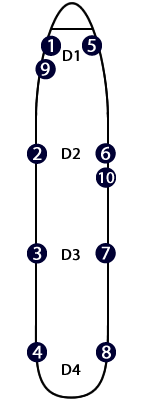
| 1 | IFM |
| 2 | Look Gorgeous! |
| 3 | Boarding D2LFlying Start |
| 4 | IFL |
| 5 | Galley FirstBoarding D1L |
| 6 | Galley Club |
| 7 | Duty Free |
| 8 | Galley WT/WT+PAs |
| 9 | Look Gorgeous! |
| 10 | If 9 crew:Works First2nd Break |
| * | GO |
| IFM | GO |
| * | |
| DF | |
| IFL | GO |
| * If 9 crew: | |
| 9 not carried. | |
| 10 works First | |
| and is 2nd break | |
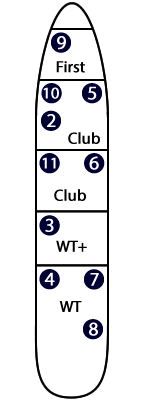
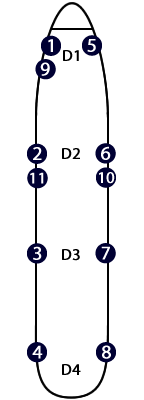
| 1 | IFM |
| 2 | Look Gorgeous! |
| 3 | Boarding D2LFlying Start |
| 4 | IFL |
| 5 | Galley FirstBoarding D1L |
| 6 | Galley Club |
| 7 | Duty Free |
| 8 | Galley WT/WT+PAs |
| 9 | Look Gorgeous! |
| 10 | Look Gorgeous! |
| 11 | Look Gorgeous! |
| GO | |
| IFM | |
| GO | |
| DF | |
| IFL | GO |
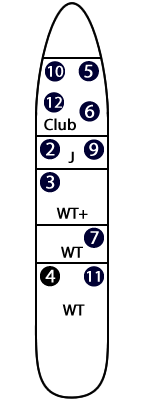
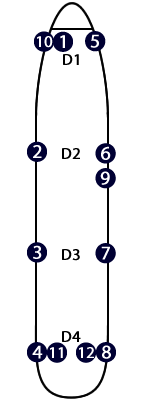
| 1 | IFM |
| 2 | Look Gorgeous! |
| 3 | Boarding D2LFlying Start |
| 4 | IFL |
| 5 | Galley ClubBoarding D1L |
| 6 | Look Gorgeous! |
| 7 | Duty Free |
| 8 | Galley WT/WT+PAs |
| 9 | Look Gorgeous! |
| 10 | Look Gorgeous! |
| 11 | Look Gorgeous! |
| 12 | Look Gorgeous! |
| IFM | GO |
| DF | |
| IFL | GO |
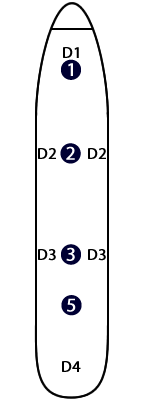
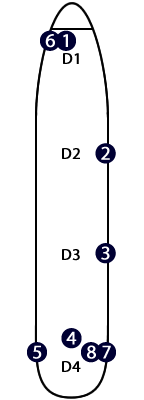
| 1 | IFM/IFLPAs |
| 2 | Club |
| 3 | Cover D3L/R |
| 4 | Galley RearCover D4L/RPAs |
| 5 | Cover D2L/R |
| 6 | Look Gorgeous! |
| 7 | Look Gorgeous! |
| 8 | Look Gorgeous! |
| IFM/L | |
| GO | |
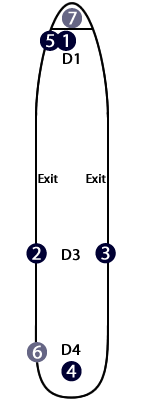
| 1 | IFM/IFLBoarding |
| 2 | Look Gorgeous! |
| 3 | Flying Start |
| 4 | TourPOS LeadPACheck CateringBoarding Rear |
| 5 | Check CateringBoarding |
| 6 | Look Gorgeous! |
| 7 | Sits F/D or pax seat |
| IFM/IFL |
| CT |
| CT/PA |
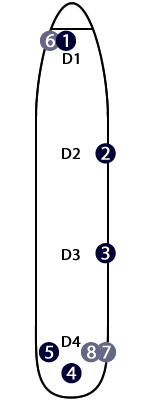
| 1 | IFM/IFLBoarding |
| 2 | Check Catering |
| 3 | Flying Start |
| 4 | TourPOS LeadPACheck CateringBoarding Rear |
| 5 | Duty Free |
| 6 | Look Gorgeous! |
| 7 | Look Gorgeous! |
| 8 | Look Gorgeous! |
| IFM |
| CT |
| CT/PA |
| DF |
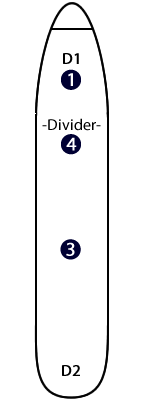
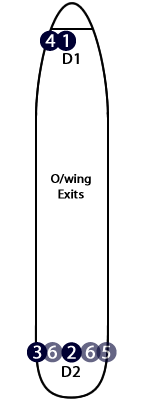
| 1 | IFM/IFLBoarding |
| 2 | TourPOS LeadPAsCheck CateringBoarding Rear |
| 3 | Duty FreeFlying Start |
| 4 | Check CateringBoarding |
| 5 | Look Gorgeous! |
| 6 | Look Gorgeous! |
| IFM |
| CT |
| CT/PA |
| DF |
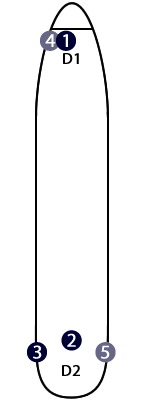
| 1 | IFM/IFLBoardingCheck Catering |
| 2 | TourPOS LeadPAsCheck CateringBoarding Rear |
| 3 | Duty FreeFlying Start |
| 4 | Look Gorgeous! |
| 5 | Look Gorgeous! |
| IFM |
| CT/PA |
| DF |
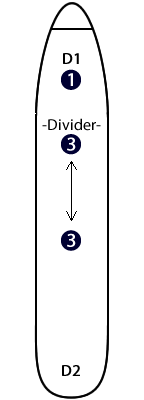
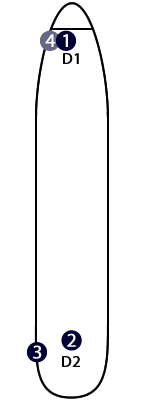
| 1 | IFM/IFLBoardingIFR/Bars |
| 2 | BoB LeadPAsFlying StartBars |
| 3 | Duty Free |
| 4 | Look Gorgeous! |
| IFM |
| GL/PA |
| DF |


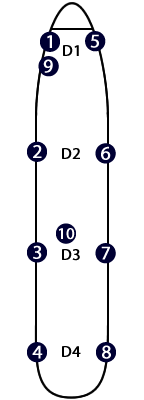
| 1 | IFM |
| 2 | Club Galley |
| 3 | Boarding |
| 4 | WT GalleyActing IFMPAs |
| 5 | Look Gorgeous! |
| 6 | Duty Free |
| 7 | Duty FreeLead PodSkyflyer Packs |
| 8 | Look Gorgeous! |
| 9 | Flying Start |
| 10 | BoardingWT+ Pre Take-Off |
| SCM | |
| GO | DF |
| DF | |
| GO |
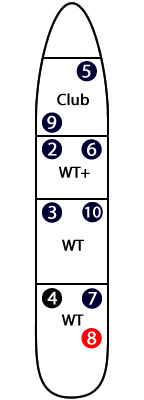
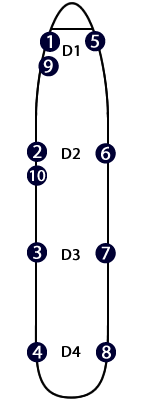
| 1 | IFM |
| 2 | Look Gorgeous! |
| 3 | Boarding D2LFlying Start |
| 4 | IFL |
| 5 | Boarding D1LGalley Club |
| 6 | Galley WT+ |
| 7 | Duty Free |
| 8 | Galley WTPAs |
| 9 | Look Gorgeous! |
| 10 | Look Gorgeous! |
| IFL | |
| GO | |
| GO | |
| DF | |
| IFL | GO |
This website is not an official BA website or any other airline official website. It is designed to assist in Pre-Flight Briefing and to carry out your role. Whilst we endeavour to keep it correct and up-to-date, the individual crew member is responsible for checking the official documentation as the final reference for correct and up-to-date information.
You will need a data connection to access the website.
If there are any errors, or changes not updated please let me know - via my website point2webdesign.com
1. Select Aircraft Type. Each aircraft page shows working positions based on cabin worked and more or less door position. IFM is set as selected already.
Blue buttons are first break.
1st Break
Red buttons are second break.
2nd Break
2. Tap each button as that position is chosen. That position disappears.
IFM
Remaining positions remain visible to make choice easier.
GO = Galley Operator
DF = Duty Free
IFM = In Flight Manager
IFL = In Flight Lead
CT = Check Catering
Tapping any already selected button will make that position re-appear (for the 'indecisive' ones that change their minds! ;-) Tapping the refresh button (circular arrow) at the top makes all the positions visible again.
The home button takes you back to list of aircraft.
From each aircraft page you can also see Demo Positions, Seating Positions and Responsibilities.
Finally there are links to frequently used websites and applications. You will need to login to view some.
OMNs especially useful in the briefing. So sign in before you're put on the spot!
I am ex BA Cabin Crew. I am also a Web Designer.
I hope you like it and find it useful. If you have any ideas how to improve it, let me know.
And if you ever need a new website or you have a website that could do with updating, then bear me in mind.
Contact me via my website point2webdesign.com
Happy landings.
Chris
Last updated: May 2026
The information contained on this website 'Working Positions' (the "Service") is for general information purposes only.
The owner assumes no responsibility for errors or omissions in the contents on the Service.
In no event shall the owner be liable for any special, direct, indirect, consequential, or incidental damages or any damages whatsoever, whether in an action of contract, negligence or other tort, arising out of or in connection with the use of the Service or the contents of the Service. Working Positions Plus reserves the right to make additions, deletions, or modification to the contents on the Service at any time without prior notice.
The owner does not warrant that the Service is free of viruses or other harmful components, although we have not placed any within the Service.
External links disclaimer
This website may contain links to external websites that are not provided or maintained by or in any way affiliated with 'Working Positions'.
Please note that the owner does not guarantee the accuracy, relevance, timeliness, or completeness of any information on these external websites.
All rights reserved. No part of this website may be reproduced, distributed, or transmitted in any form or by any means, including photocopying, recording, or other electronic or mechanical methods, without the prior written permission of the publisher.
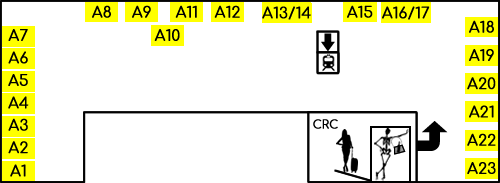
Rotate device to view full map.
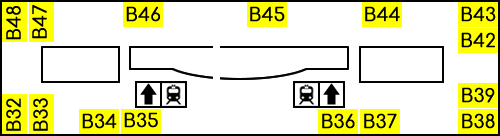
Rotate device to view full map.
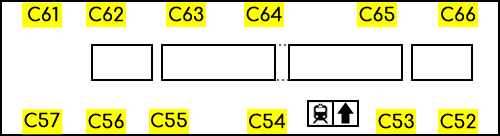
Rotate device to view full map.
1. Select Aircraft Type. Each aircraft page shows working positions based on cabin worked and more or less door position. IFM is set as selected already.
Blue buttons are first break.
1st Break
Red buttons are second break.
2nd Break
2. Tap each button as that position is chosen. That position disappears.
IFM
Remaining positions remain visible to make choice easier.
GO = Galley Operator
DF = Duty Free
IFM = In Flight Manager
IFL = In Flight Lead
CT = Check Catering
Tapping any already selected button will make that position re-appear (for the 'indecisive' ones that change their minds! ;-) Tapping the refresh button (circular arrow) at the top makes all the positions visible again.
The home button takes you back to list of aircraft.
From each aircraft page you can also see Demo Positions, Seating Positions and Responsibilities.
Finally there are links to frequently used websites and applications. You will need to login to view some.
OMNs especially useful in the briefing. So sign in before you're put on the spot!
